Why Apple Pro Technologies?
Mobile Lab's main workstation contains the maximum configuration of processors, ram, SSD's and graphics boards in Apple's new, hyperfast Mac Pro, also fitted with the added Afterburner - a card defined as a "Game-Changing Accelerator". This monster machine can process contemporarily 6 streams of ProRes 8K RAW or 23 streams of ProRes 4K RAW.
The ability to grade native 8K is even more critical than editing it.
Mobile Digital Lab also sports two of Apple's brilliant new 1000 nits. 32" displays - the 6k XDR's, which can also display HDR. In the words of Jarred Land, president Red Digital Cinema "Apple’s new hardware brings a mind‐blowing level of performance to proxy‐free r3d workflows".
Grant Petty, CEO of Blackmagic Design adds;
"With the new Mac Pro and Afterburner, we see full‐quality 8K performance in real-time with colour correction and effects, something we could never dream of doing before. DaVinci Resolve running on the new Mac Pro is easily the fastest way to edit, grade, and finish movies and TV shows.”
"In my modest opinion, I can say that I bought my first Mac more than 40 years ago, and I've always preferred them to other operating systems, thanks to their ease of use and reliability; now that the new powerful multi-processor pro workstations have become extremely powerful workhorses, and offer the flexibility of numerous card slots, its a no - brainer". (co-founder David Bush)
Why Apple Pro Technologies?
Mobile Lab's main workstation contains the maximum configuration of processors, ram, SSD's and graphics boards in Apple's new, hyperfast Mac Pro, also fitted with the added Afterburner - a card defined as a "Game-Changing Accelerator". This monster machine can process contemporarily 6 streams of ProRes 8K RAW or 23 streams of ProRes 4K RAW.
The ability to grade native 8K is even more critical than editing it.
Mobile Digital Lab also sports two of Apple's brilliant new 1000 nits. 32" displays - the 6k XDR's, which can also display HDR. In the words of Jarred Land, president Red Digital Cinema "Apple’s new hardware brings a mind‐blowing level of performance to proxy‐free r3d workflows".
Grant Petty, CEO of Blackmagic Design adds;
"With the new Mac Pro and Afterburner, we see full‐quality 8K performance in real-time with colour correction and effects, something we could never dream of doing before. DaVinci Resolve running on the new Mac Pro is easily the fastest way to edit, grade, and finish movies and TV shows.”
"In my modest opinion, I can say that I bought my first Mac more than 40 years ago, and I've always preferred them to other operating systems, thanks to their ease of use and reliability; now that the new powerful multi-processor pro workstations have become extremely powerful workhorses, and offer the flexibility of numerous card slots, its a no - brainer". (co-founder David Bush)
Why Apple Pro Technologies?
Mobile Lab's main workstation contains the maximum configuration of processors, ram, SSD's and graphics boards in Apple's new, hyperfast Mac Pro, also fitted with the added Afterburner - a card defined as a "Game-Changing Accelerator". This monster machine can process contemporarily 6 streams of ProRes 8K RAW or 23 streams of ProRes 4K RAW.
The ability to grade native 8K is even more critical than editing it.
Mobile Digital Lab also sports two of Apple's brilliant new 1000 nits. 32" displays - the 6k XDR's, which can also display HDR. In the words of Jarred Land, president Red Digital Cinema "Apple’s new hardware brings a mind‐blowing level of performance to proxy‐free r3d workflows".
Grant Petty, CEO of Blackmagic Design adds;
"With the new Mac Pro and Afterburner, we see full‐quality 8K performance in real-time with colour correction and effects, something we could never dream of doing before. DaVinci Resolve running on the new Mac Pro is easily the fastest way to edit, grade, and finish movies and TV shows.”
"In my modest opinion, I can say that I bought my first Mac more than 40 years ago, and I've always preferred them to other operating systems, thanks to their ease of use and reliability; now that the new powerful multi-processor pro workstations have become extremely powerful workhorses, and offer the flexibility of numerous card slots, its a no - brainer". (co-founder David Bush)
David Bush & Mike Connor present a cutting edge editing, colour grading and DIT unit created by them & based on their wish lists for post-production after decades of production and post-production experience.
The system is placed on or near set and is designed to save time & money for producers while offering exceptional quality for advertising, documentary, film & television production and post.
The core of the system is an extremely powerful workstation based on a fully optioned Apple Mac Pro with Da Vinci Resolve software & hardware. The combination avoids the need to use the traditional off-line (or with proxies) workflow, then re-conforming on-line, and the time required for this.
With the Mobile Lab, it is now possible to work with a full high-resolution deliverable or master in HD, 2k, 4k, or 8k from the first day of shooting.
The Mobile Lab is both a lightning-fast DIT workstation and creative editorial, colour grading and audio editing hub - all within a single system.
David Bush & Mike Connor present a cutting edge editing, colour grading and DIT unit created by them & based on their wish lists for post-production after decades of production and post-production experience.
The system is placed on or near set and is designed to save time & money for producers while offering exceptional quality for advertising, documentary, film & television production and post.
The core of the system is an extremely powerful workstation based on a fully optioned Apple Mac Pro with Da Vinci Resolve software & hardware. The combination avoids the need to use the traditional off-line (or with proxies) workflow, then re-conforming on-line, and the time required for this.
With the Mobile Lab, it is now possible to work with a full high-resolution deliverable or master in HD, 2k, 4k, or 8k from the first day of shooting.
The Mobile Lab is both a lightning-fast DIT workstation and creative editorial, colour grading and audio editing hub - all within a single system.
David Bush & Mike Connor present a cutting edge editing, colour grading and DIT unit created by them & based on their wish lists for post-production after decades of production and post-production experience.
The system is placed on or near set and is designed to save time & money for producers while offering exceptional quality for advertising, documentary, film & television production and post.
The core of the system is an extremely powerful workstation based on a fully optioned Apple Mac Pro with Da Vinci Resolve software & hardware. The combination avoids the need to use the traditional off-line (or with proxies) workflow, then re-conforming on-line, and the time required for this.
With the Mobile Lab, it is now possible to work with a full high-resolution deliverable or master in HD, 2k, 4k, or 8k from the first day of shooting.
The Mobile Lab is both a lightning-fast DIT workstation and creative editorial, colour grading and audio editing hub - all within a single system.
David Bush & Mike Connor present a cutting edge editing, colour grading and DIT unit created by them & based on their wish lists for post-production after decades of production and post-production experience.
The system is placed on or near set and is designed to save time & money for producers while offering exceptional quality for advertising, documentary, film & television production and post.
The core of the system is an extremely powerful workstation based on a fully optioned Apple Mac Pro with Da Vinci Resolve software & hardware. The combination avoids the need to use the traditional off-line (or with proxies) workflow, then re-conforming on-line, and the time required for this.
With the Mobile Lab, it is now possible to work with a full high-resolution deliverable or master in HD, 2k, 4k, or 8k from the first day of shooting.
The Mobile Lab is both a lightning-fast DIT workstation and creative editorial, colour grading and audio editing hub - all within a single system.
David Bush
David Bush

David Bush
David Bush
David Bush

David Bush
David Bush
Raw files
Raw files are a clever compromise developed to get the best possible image quality out of digital cameras without over-doing the amount of data. This has a beneficial effect on the complexity and cost of post-production. and is worth addressing when choosing digital cameras for a project.
More than 20 years ago Peter Swinson of Rank Cintel demonstrated the benefits of using higher resolutions to obtain higher image quality with compression to relatively small amounts of data. I was privileged to have seen the demo myself. Thanks to him, and with major camera manufacturers developing the concept, we've understood that the higher the resolution, the more effective and visually lossless image compression becomes, and the better the end result will be.
Red Digital Cinema has developed over the last 20 years a wide range of digital cameras with very high resolution sensors offering the best possible image quality, and the manufacturer has built on raw files to make post-production as efficient as possible.
In terms of data rate, the Red in 8k Raw generates less than 500 Mbits/sec. This data rate is only a quarter of Mobile Lab's capability to playback and work in real-time in 8k with its current configuration of boards, ram, SSD drives and 28 processors in Mac Pro's frame. Hence the amount of data is eminently manageable, and there are many reasons to exploit this. On the other hand uncompressed formats such as Arriraw can require 5800 Mbits/sec. and more data rate. This puts some stress on post-production hardware, which, in the end, translates into greater expense.
However, Apple's new Pro Res HQ can solve this issue with a data rate of around 500 Mbits/sec. although it is only available on the latest Arri cameras.
Black Magic Design has also created their own sauce of raw for their digital cameras, and now many other manufacturers are following suit and are offering improved post-production solutions.


8K Technical notes
Some digital camera examples

Red's Redcode
From Red Digital Cinema's website: "Raw is the revolutionary wavelet based compression codec that unlocks unbelievable image capture potential and creative flexibility. allowing creators to capture anything from 4k to 8k raw with manageable file sizes and visually lossless image fidelity"

Blackmagic RAW
From the Black Magic website: "Black Magic Raw is a modern codec that’s easier to use and much better quality than popular video formats, yet has all the benefits of the reduced amount of data. It offers us visually lossless images that are ideal for high resolution, high frame rate and high dynamic range workflows. Incredible image quality, extensive metadata support and highly optimized GPU and CPU accelerated processing make Blackmagic RAW usable for acquisition, post production and finishing". Specifically, the Raw format uses full bandwidth colour information, and which makes it excellent for colour grading.

Arri's Arriraw
ARRI now offers a more post friendly workflow with Pro Res HQ available on the more recent camera models. The current maximum resolution is 6.5K.

Sony Alpha Raw
From the Sony website: "A file with the ARW file extension stands for Sony Alpha Raw, and is, therefore, a Sony RAW Image file. A raw image format means that the file hasn't been compressed or manipulated in any way; it's in the same raw form it was when the camera first captured it". Sony Alpha Raw files are leggible wth Resolve, so can be input without transcoding. The current maximum resolution is 6.5K.
Information on digital cameras from Netflix

Netflix specifies camera models acceptable for their productions, and the other streaming services seem to follow suit. These requirements mean that the ARRI Alexa, ARRI Alexa Mini, and ARRI Amira cannot be used on original Netflix productions. If you want to use an ARRI camera then you can choose between the ALEXA 65 or the recently added ALEXA LF.
This is because Netflix specifications state that a camera must have a true 4K UHD sensor (equal to or greater than 3840 photosites wide) and that 90% of the total runtime of a final program should be captured on an approved camera. The only exception to the 90% rule is for nonfiction content, where the threshold can be more flexible.
Also any cameras other than the primary camera (crash, POV, drone, underwater, etc.) must be approved.
Calibration and Steve Shaw's
light illusion


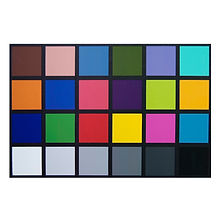
Anyone mastering images for later viewing on any display must use an accurately calibrated grading display. There is no alternative to this, regardless of the expected viewing environment or relative accuracy of the final displays the material will be viewed on. This includes material expected to be viewed in a theatre; on home TVs; on the web; on mobile phones & tablets, with digital signage - in other words, anywhere.
Calibration is achieved by the use of a probe, which measures the amount of light in the environment as a first operation. Steve Shaw of Light Illusion states that the ambient light for Home Entertainment should be 10 nits (just under 3 foot lamberts). The room is set at 10 nits by regulating the lights and using black cloth.
Care should be taken to avoid as far as possible reflections on the grading screens, and the room itself should be preferably without windows to exteriors with their associated changing light. One fairly inexpensive solution to expedite set up time and the amount of ambient light is to use a pop up black gazebo such as the one in the link and make a "room within a room".
Once the ambient light level is ascertained and then set up in the Light Illusion software, then the probe is used to measure the screen's brightness, gamma and colorimetry with a sequence of specific colour patches displayed. Finally, the software elaborates a 3d LUT from the readings, and this is applied to the images sent to the Apple XDR screen so that it will display the colours, gamma and intensity we need for specific projects.
For theatrical deliverables, image calibration can be achieved if there is a room that can be darkened so that it can become as dark as a Cinema. The afore-mentioned pop up gazebo may work well for this too.
Calibration for digital signage needs to take into account whether this is going to be displayed in interiors or exteriors and the Apple XDR screen rotates easily to become a vertical display for this and other vertical formats. Events will also have a particular calibration depending on the lighting at the event itself.